
Financial Management System (FMS)
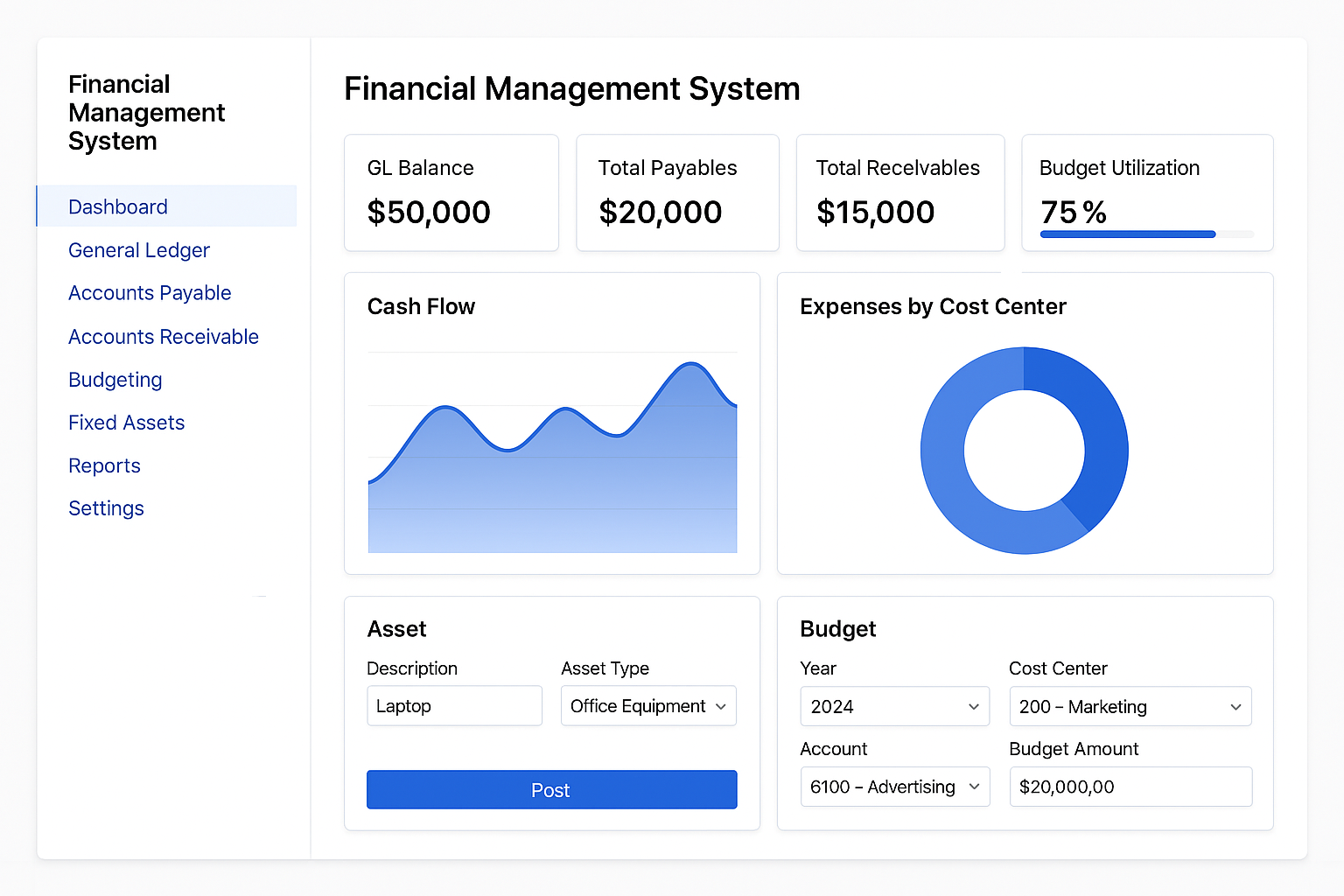
Software Architecture Overview
Core Modules
| Module | Purpose |
|---|---|
| General Ledger (GL) | Central repository for all financial transactions, period control, audit trails |
| Accounts Payable (AP) | Manage supplier details, invoices, payments, terms, and reconciliation |
| Accounts Receivable (AR) | Track receivables, customer statements, ageing analysis, clearance |
| Cost Centers | Analyze expenses and allocate budgets across departments/projects |
| Fixed Assets | Track asset lifecycle, depreciation, GL integration, cost center assignment |
| Budgeting | Build dynamic budgets, compare to actuals, embed within Chart of Accounts |
Key Features Breakdown
Period Handling
- Simultaneous operations in two consecutive periods
- Locking/unlocking specific periods
- Post to any period (current or prior year)
Document & Reporting Flexibility
- Auto/manual Account Code generation
- Multi-document support with independent serials
- Print Receipts, Payments, Statements on preprinted stationery
- Export reports to Excel, SQL, Dbase, Text, or direct to screen/printer
- Full audit trail for every transaction and edit
Currency & Budget Control
- Single to multi-currency switch with real-time conversions
- Budgeting integrated into Chart of Accounts
- Allocate budgets per cost center with comparisons and alerts
Security & Access
- Role-based access control (account-level or group-based)
- User profiles with granular authorization for operations or reports
Transaction Management
- Online invoice clearance against cheques/payments/receipts
- Ageing analysis with automatic/manual due dates
- History retention up to 10 years with clearing capabilities
Cost Centers & Analysis
- Define at both account and transaction levels
- Flexible analysis reports filtered by date, currency, budget, or department
Fixed Asset Management
- Acquisition to disposal tracking
- Support for straight-line, reducing balance, and custom depreciation
- Integration with GL and Cost Centers
Technologies
- Frontend: Angular or Blazor for interactive dashboards and forms
- Backend: ASP.NET Core or PHP with RESTful APIs
- Database: SQL Server or MySQL
- Reporting: SSRS, Crystal Reports, or custom reporting engine
- Security: OAuth2, JWT, Active Directory integration
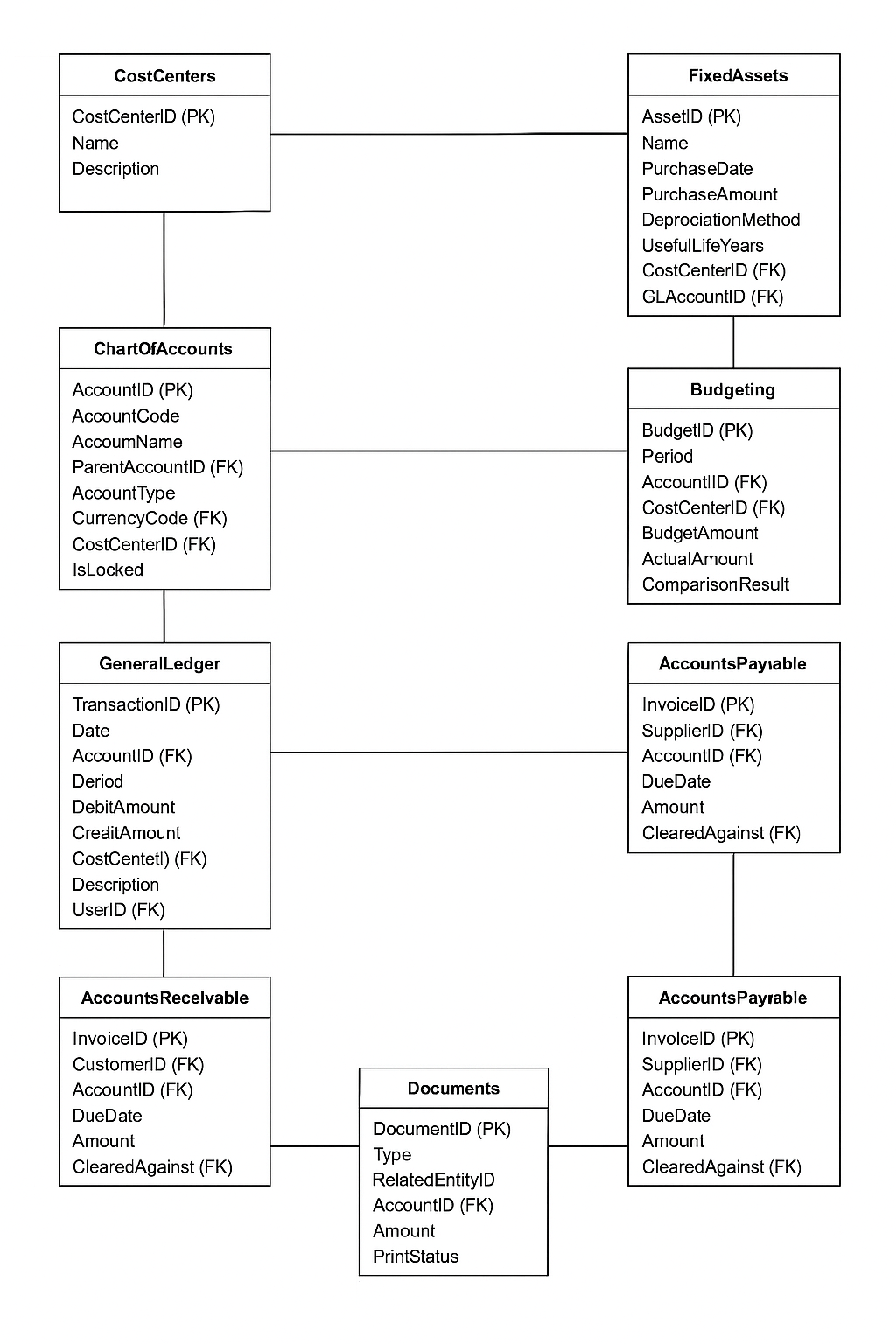
Core Tables and Relationships
Following is the tabular structure of Financial Management System.
Core Tables & Relationships
ChartOfAccounts
| Column Name | Type | Notes |
| AccountID | INT (PK) | Unique account identifier |
| AccountCode | VARCHAR | Auto/manual generation |
| AccountName | VARCHAR | Descriptive title |
| ParentAccountID | INT (FK) | For hierarchical charting |
| AccountType | VARCHAR | GL, AP, AR, etc. |
| CurrencyCode | VARCHAR | For multi-currency support |
| CostCenterID | INT (FK) | Optional link to cost center |
| IsLocked | BOOLEAN | For period locking |
GeneralLedger
| Column Name | Type | Notes |
| TransactionID | INT (PK) | Unique transaction reference |
| Date | DATE | Transaction date |
| AccountID | INT (FK) | GL account |
| Period | VARCHAR | Accounting period |
| DebitAmount | DECIMAL | Amount debited |
| CreditAmount | DECIMAL | Amount credited |
| CostCenterID | INT (FK) | Optional linkage |
| Description | TEXT | Transaction detail |
| UserID | INT (FK) | For audit trail |
CostCenters
| Column Name | Type | Notes |
| CostCenterID | INT (PK) | Unique ID |
| Name | VARCHAR | Cost center name |
| Description | TEXT | Optional detail |
AccountsReceivable / AccountsPayable
(Similar structure for both) | Column Name | Type | Notes | |———————|————-|——-| | InvoiceID | INT (PK) | Unique document | | CustomerOrSupplierID| INT (FK) | Linked party | | AccountID | INT (FK) | GL linkage | | DueDate | DATE | For ageing analysis | | Amount | DECIMAL | Total amount | | Status | VARCHAR | Paid, Partial, Overdue | | ClearedAgainst | INT (FK) | Payment/Cheque/Receipt linkage |
FixedAssets
| Column Name | Type | Notes |
| AssetID | INT (PK) | Unique asset |
| Name | VARCHAR | Asset name |
| PurchaseDate | DATE | Acquisition date |
| PurchaseAmount | DECIMAL | Initial value |
| DepreciationMethod | VARCHAR | Straight-line, etc. |
| UsefulLifeYears | INT | Duration before write-off |
| ResidualValue | DECIMAL | Salvage value |
| CostCenterID | INT (FK) | Asset-linked cost center |
| GLAccountID | INT (FK) | GL linkage |
Budgeting
| Column Name | Type | Notes |
| BudgetID | INT (PK) | Unique record |
| Period | VARCHAR | Budget year/month |
| AccountID | INT (FK) | Budgeted account |
| CostCenterID | INT (FK) | Optional linkage |
| BudgetAmount | DECIMAL | Planned budget |
| ActualAmount | DECIMAL | Tracked from GL |
| ComparisonResult | VARCHAR | Over/Under/On-target |
Users & Permissions
| Column Name | Type | Notes |
| UserID | INT (PK) | Unique user |
| Username | VARCHAR | Login credential |
| Role | VARCHAR | Admin, Accountant, Viewer, etc. |
| Permissions | JSON/Text | Granular rights (account-level if needed) |
Documents
| Column Name | Type | Notes |
| DocumentID | INT (PK) | Serial number |
| Type | VARCHAR | Receipt, Statement, etc. |
| RelatedEntityID | INT (FK) | Customer/Supplier |
| AccountID | INT (FK) | GL linkage |
| Amount | DECIMAL | Total amount |
| PrintStatus | BOOLEAN | Printed or not |
Entity Relation Diagram
User-Friendly Screens
Here’s a full suite of clean, user-friendly screen layouts tailored for your Financial Management System—structured to capture every input and interaction across your modules. These visuals are presented as wireframe-style descriptions to help you or your designers bring them to life in HTML, Angular, or any preferred tech stack.
Dashboard Screen
- Quick Summary Cards: GL Balance, Total Payables, Receivables, Assets Value, Budget Utilization
- Charts: Cash flow, Expense by Cost Center, Depreciation Map
- Navigation Bar: GL, AP, AR, Budgeting, Fixed Assets, Reports, Settings
Chart of Accounts Screen
- Account Tree Viewer (hierarchy drill-down)
- New Account Form:
- Account Name, Code (Manual/Auto)
- Parent Account
- Currency
- Type (GL, AP, AR…)
- Cost Center Link
- Locking Toggle
General Ledger Entry Screen
- Select Period (with dual period display)
- New Entry Form:
- Date, Description
- Debit / Credit Amounts
- Account dropdown
- Cost Center (optional)
- Attach document
- View: Table with filters (Account, Period, Date)
Cost Center Management Screen
- List of Cost Centers with usage metrics
- Form to Add/Edit:
- Name, Description
- Assign to Accounts or Transactions
- Budget Allocation (if applicable)
Accounts Payable & Receivable Screens
- Invoice Entry:
- Supplier/Customer
- GL Account
- Date, Due Date
- Amount, Tax, Status
- Linked Payment/Cheque
- Clearance Tab:
- Match invoice to payment
- Ageing Analysis:
- Automatic/manual due assignment
Fixed Asset Tracking Screen
- Asset List: Filter by Location, Status, Useful Life Remaining
- Add New Asset:
- Name, Purchase Date/Amount
- Depreciation Method & Frequency
- Residual Value
- Linked GL & Cost Center
- Depreciation Scheduler:
- Run periodic processing
- Manual override with audit trail
Budgeting Screen
- Budget Plan Builder:
- Select Accounts and Periods
- Allocate Amounts
- Link to Cost Centers
- Budget Comparison:
- Actual vs Budget
- Color-coded results (Over/Under/Matched)
User & Security Settings Screen
- User List with Roles
- Permissions Matrix:
- Assign rights per account/module
- Group configuration
- Audit Logs & Access History
Document Center
- Multi-document tracking by type
- Serial Number Generator
- Print Settings for Receipts/Statements
- Toggle preprinted stationery options
Reporting Hub
- Generate Reports:
- Filter by date, currency, account, cost center
- Export Options:
- Excel, SQL, DBase, Text
- Preview on screen or send to printer
Period Control Panel
- Simultaneous Period Operation
- Lock/Unlock periods
- Post transactions to current/prior year
Note: For demo purpose only. For more information please contact